
What is unix?
It is a family of operating system , MacOs , Android , iOs , Linux ect.
Components of unix?
Unix is made up of three components-
- Kernal
- Shell
- Utilities
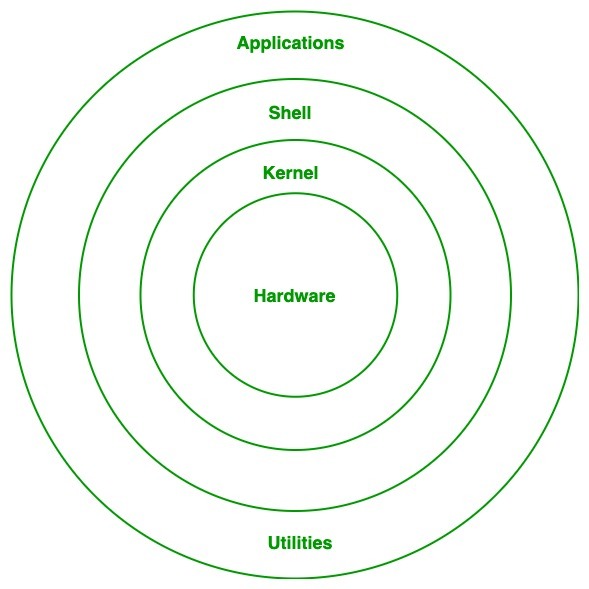 kernal
It is the hub of computer
Shell
It is the interface b/w user and the kernal
Shell has two type -
a. BASH [bourne again shell]- $ prompt
b. C shell - % prompt
Utilities
Application is build on the top of it , they have nice GUI [graphical user interface] hence easy to use
Unix commands
cd : change directory
ls : List of stuff
Pwd : present working directory
ls-s : sorted by size
cd .. : to go back in present directory i.e step back
ls-l : it show all description of file such as name, time , no of files inside etc.
ls-a : it similar to "ls-l" command but it also shows hidden files
ls-r : it shows files in reverse order
rm : to remove present working directory
head : it shows top 10 lines of files
tail : it shows bottom 10 lines of files
cat : to display the files in terminal screen
touch : to creat a new file
echo : to print on the terminal screen
exit : to exit the terminal screen
clear : to clear the terminal screen
man : used to display manual for any command
nano : to open editor window for the file or to write anything inside the file
grep : used to find string or to highlight any words in the file
gerp-n : used to find no. of string to hightlight no. of words in the file
mkdir : make directory
rmdir : used to remove empty directory
rm-r : to delete non-empty directory
mv [oldname] [newname] : used to rename the folder
cp [source name] [destination name] : used to copy file
Your suggestions and feedbacks are appreciated. You can write back to me on: lovekushrazput143@gmail.com